Table of Contents
Most contact centers review 1% to 3% of their calls. Nobody picked that number on purpose. It’s what a QA team can listen to in a week, and over time it started to feel like enough.
The cost of that sample is easy to miss. Say an agent skips a required disclosure or mishandles an escalation. A 2% sample will usually miss it. You find out later, from a complaint, a cancelled account, or a compliance finding.
In our recent webinar, “Take the guesswork out of QA,” Niki Kollia, Director of Solutions Consulting, walked through automated quality management (AQM) in SuccessKPI. Dave Toliver, Chief Marketing Officer, opened with the business case. Here’s what they covered and what it looks like in the product.
Ask a different question
Niki framed the shift in one line. Instead of asking “Which calls should I listen to?”, ask “What can we learn if we evaluate every interaction?”
AQM scores interactions automatically against criteria you define. Coverage moves from a sample to the full population for the questions you configure. At that scale, problems that hid in the other 98% start to show up. Niki pointed to three.
Three use cases you’ll recognize
Compliance and Risk
Automatically flag interactions where a required disclosure, ID confirmation, or script step was missed.
Coaching at Scale
Automatically surface your lowest-scoring agents and interactions, so team leads kmow where to focus this week.
Escalation & Churn Risk
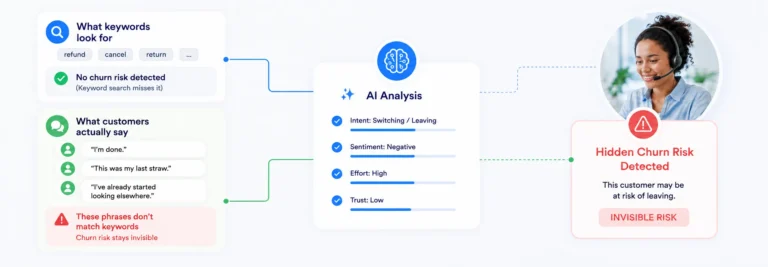
Flag negative sentivment or unresolved issues before a customer escalates further or churns entirely.
Compliance and risk. Agents may need to read a disclosure, confirm identity, or follow a regulated script. AI-Powered Auto Quality Management flags each interaction where that step was missed. You no longer depend on a reviewer happening to pull that call.
Coaching at scale. AQM surfaces the lowest-scoring agents and interactions automatically. Team leads know where to spend coaching time this week, not next quarter.
Escalation and churn risk. Negative sentiment and unresolved issues get flagged early. You can act before the customer calls back angrier or leaves.
Compare AI scores with your own evaluators
Skepticism about AI scoring is reasonable, so the demo started with a dashboard that puts AI scores and human scores side by side. It shows calls evaluated, average scores, trends over time, and where the two disagree. When AI and a human score the same question differently, color coding flags the gap.
The agent view breaks scores out by agent and by question. In the demo, one question stood out: “Did the agent understand the customer issue?” Four of five agents scored low on it. A small sample can hide a pattern like that. A coaching plan can fix it.
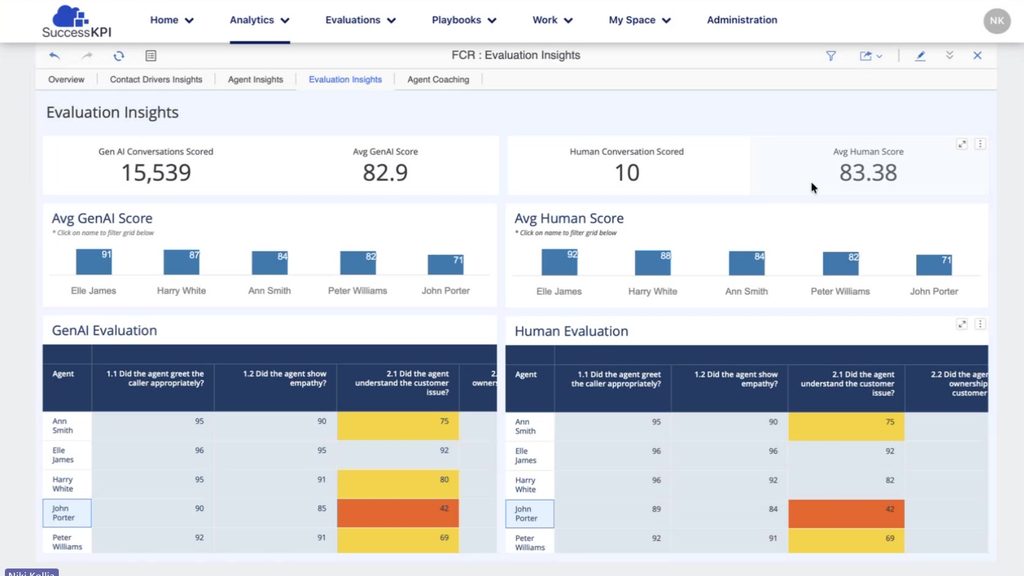
A matching panel shows manual evaluations with the evaluator, date, and score. Teams that keep human review in the mix see both views in one place.
See coverage and coaching priorities together
A third dashboard is built for the evaluator. Along the top, it shows calls handled, the automated and manual QM scores, and coaching opportunities. It also names the highest-priority agent and the weakest and strongest categories.
The coverage gap is plain here. In the demo data, manual review covered 1.4% of calls. One evaluator had reviewed 51 calls and another 69. AQM had scored all 17,736.
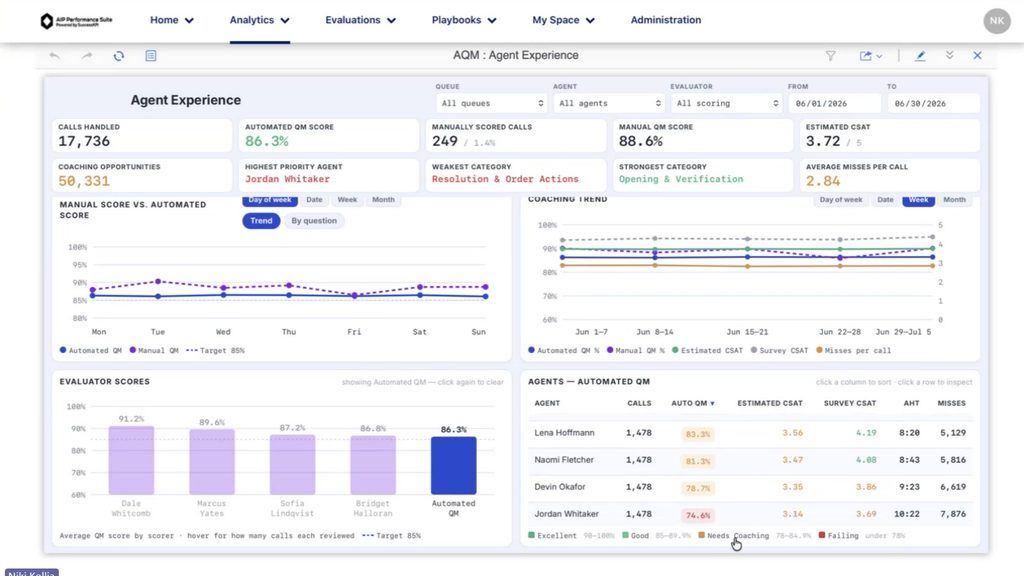
From there, you drill down. Pick an agent who’s struggling and open her weakest category. Then pick a question. You see each conversation, a summary, the AI’s answer, and the reason behind it.
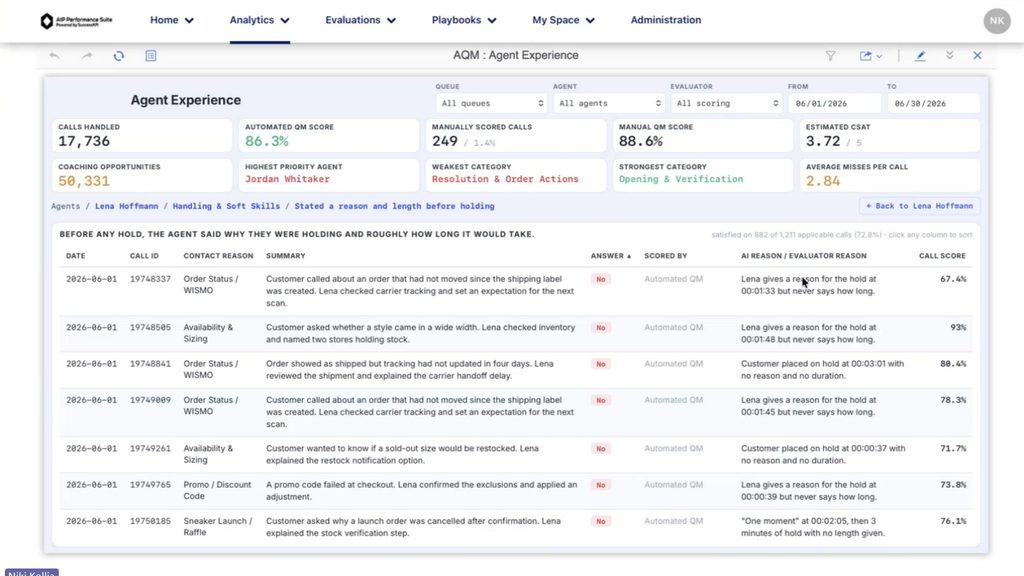
The reason matters. A score with no explanation is hard to coach from and harder to defend in a dispute.
Set it up on the forms you already use
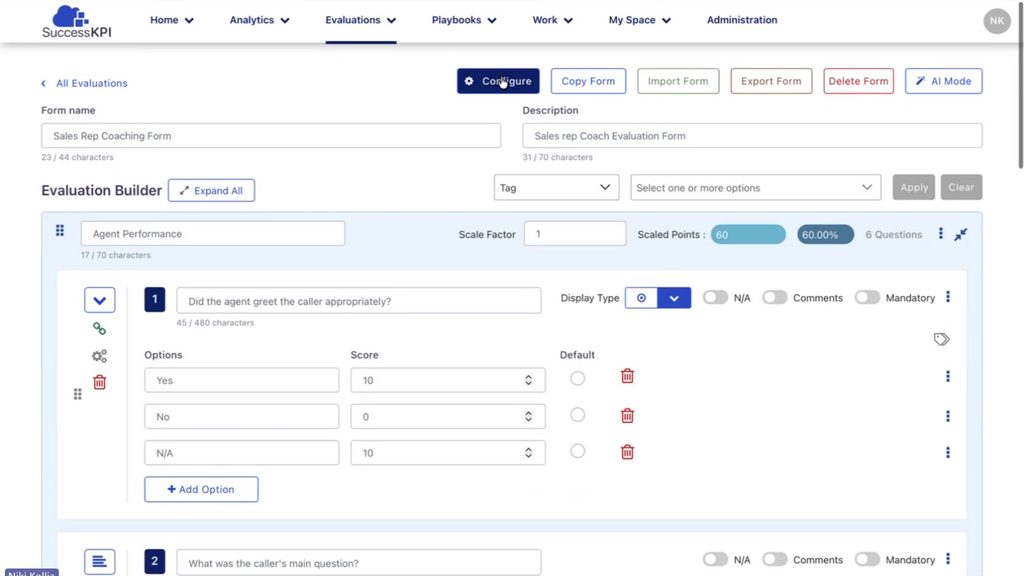
AQM runs on evaluation forms. A form defines categories, questions, and scoring. Questions can be multiple choice, yes or no, free text, or a numeric range.
You don’t build a separate form for Auto QM. Human evaluators and AI score against the same form, so both work from one rubric. Turning AQM on takes one switch in the form’s settings. Filters narrow the scope, for example to calls longer than two minutes.
Tell the AI what yes and no mean
Question guidance is where a quality leader writes down their judgment. For each question, you describe what a good answer and a poor one look like in your operation. In the demo, the guidance for “Did the agent understand the customer issue?” read:
Score yes when the agent accurately identifies or restates the customer issue, asks relevant clarifying questions, and addresses the correct problem throughout the conversation. Score no when the agent misunderstands the customer issue, repeatedly asks for information, and has the customer re-explain their concern.
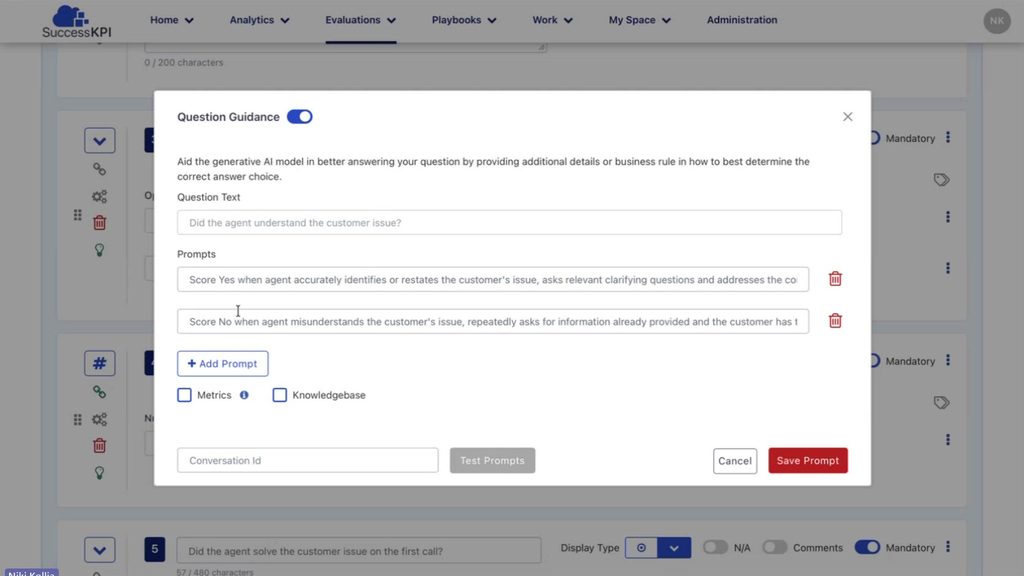
You can test the guidance on a real conversation before you save it. You can also connect a knowledge base instead of writing prompts. If documents already define your standards, AQM can use them as context. If a question needs human judgment, turn AI scoring off for that question.
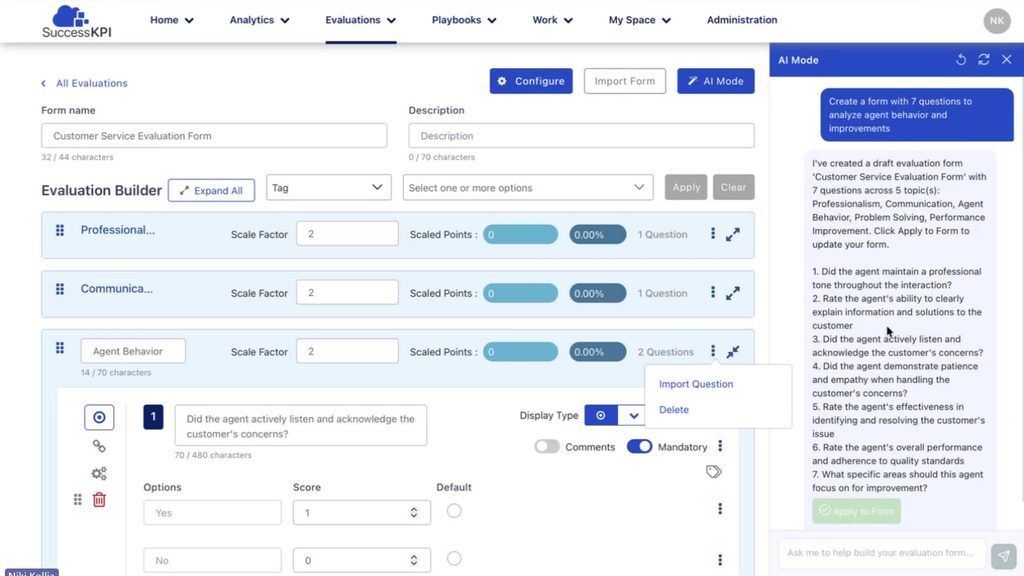
Starting from scratch? AI form creation drafts a form from plain-language instructions. In the demo, Niki asked for a seven-question form on agent behavior and improvement areas. It came back with five categories and seven questions. You refine the draft by chatting with it, apply it, then edit by hand. Scoring rules and weighting are set manually afterward. AI form creation is available on AI-enabled accounts.
Keep a human in the loop
Many teams keep some manual review alongside AQM. It’s useful for calibration, edge cases, and calls that need judgment.
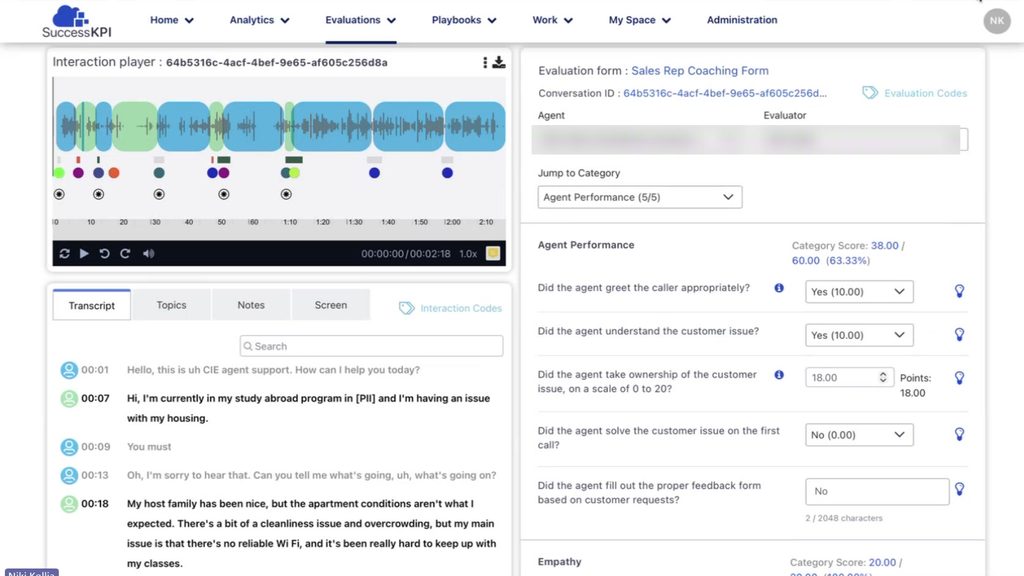
The evaluation workspace puts everything a reviewer needs in one view. That includes the recording, transcript, sentiment, topics, notes, and screen captures. Agent and customer audio are color coded. The sentiment bar shows how the call moved. In the demo call, it started negative and ended positive. When redaction is on, sensitive data is masked in the transcript.
On the right, Evaluation Co-Pilot suggests an answer for each question on the form and explains why. The evaluator reads the reasoning, then applies the answer or overrides it.
Check whether coaching worked
Finding coaching opportunities is half the job. Next, every ops leader asks whether the coaching changed anything.
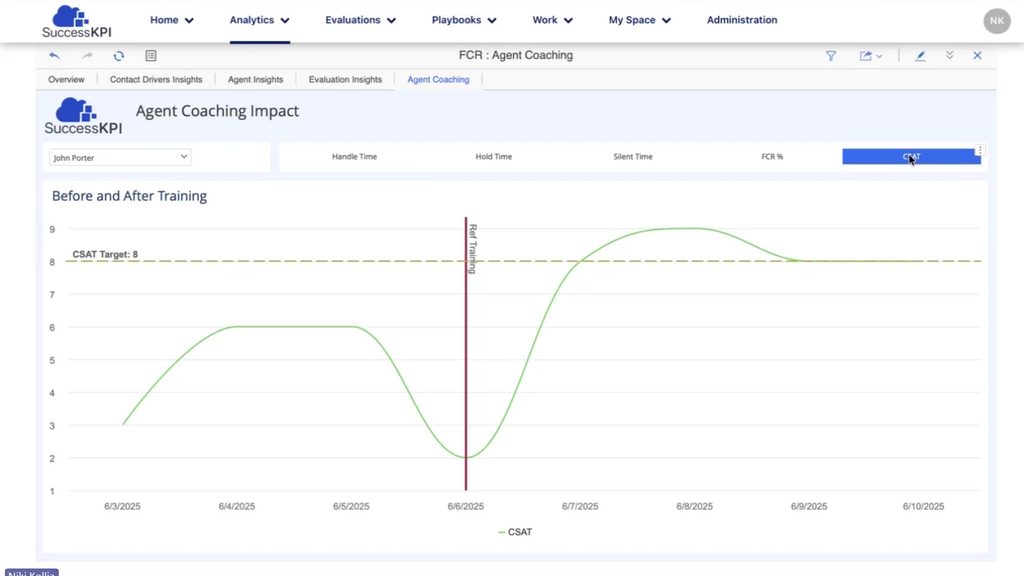
The coaching impact dashboard plots an agent’s KPIs before and after a training date, against target. In the demo, handle time dropped after training. First call resolution and CSAT both improved. You choose which KPIs the dashboard tracks.
Retention results at Mapfre
Dave shared how Mapfre, a global insurer, put full coverage to work. Like most contact centers, it reviewed about 1% of calls manually. After moving to automated scoring, it learned that most agents weren’t handling retention calls well. A few agents were much better at it than the rest.
The team studied what those agents did and trained everyone else on it. It also set up a dedicated group to take retention calls. Within about 60 days, retention on cancellation calls went from 1% to 40%. Read the full Mapfre story.
Spend less time listening for problems
Niki closed with three takeaways.
- Coverage means looking past a small sample to evaluate conversations at scale.
- Consistency means applying the same criteria to every interaction you score.
- Action means seeing what’s happening, where to focus, and what teams need to improve.
Her one-line summary of AQM: “less time listening for problems and more time solving them.”
Watch the full webinar above. To see AQM on your own interactions, request a demo or contact your CSM.