Table of Contents
Meet Deep Prompt
The brief you’d give your best analyst, applied to every call.
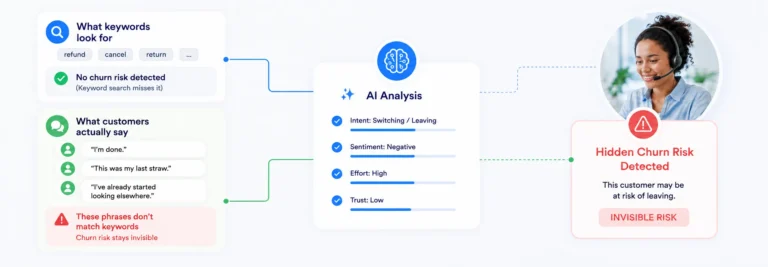
In Post 1, a telecom customer said “I’m done” and walked away while the analytics dashboard showed nothing. That was the problem. Deep Prompt is the solution.
It sits alongside Speech & Text in the SuccessKPI platform, but works differently. Instead of scanning transcripts for pre-defined phrases, Deep Prompt uses large language models to read the entire conversation and extract structured answers from within it. No code. No SQL. Plain English.
You configure it by defining two things:
What to look for
One or more plain-English prompts describing the behavior, pattern, or question you want analyzed. You can add multiple guidance prompts to layer context. Think of it as the brief you’d give a senior analyst if they had time to listen to every call.
What to return
Each output is a separate result the AI returns per conversation. Text outputs give you summaries, reasons, and classifications. Number outputs give you scores that can trigger Playbook automation: routing, alerts, escalations.
That’s it. Your guidance prompts. A few output fields. Deep Prompt runs your configuration against every conversation and returns structured, consistent results you can act on immediately.
What changes
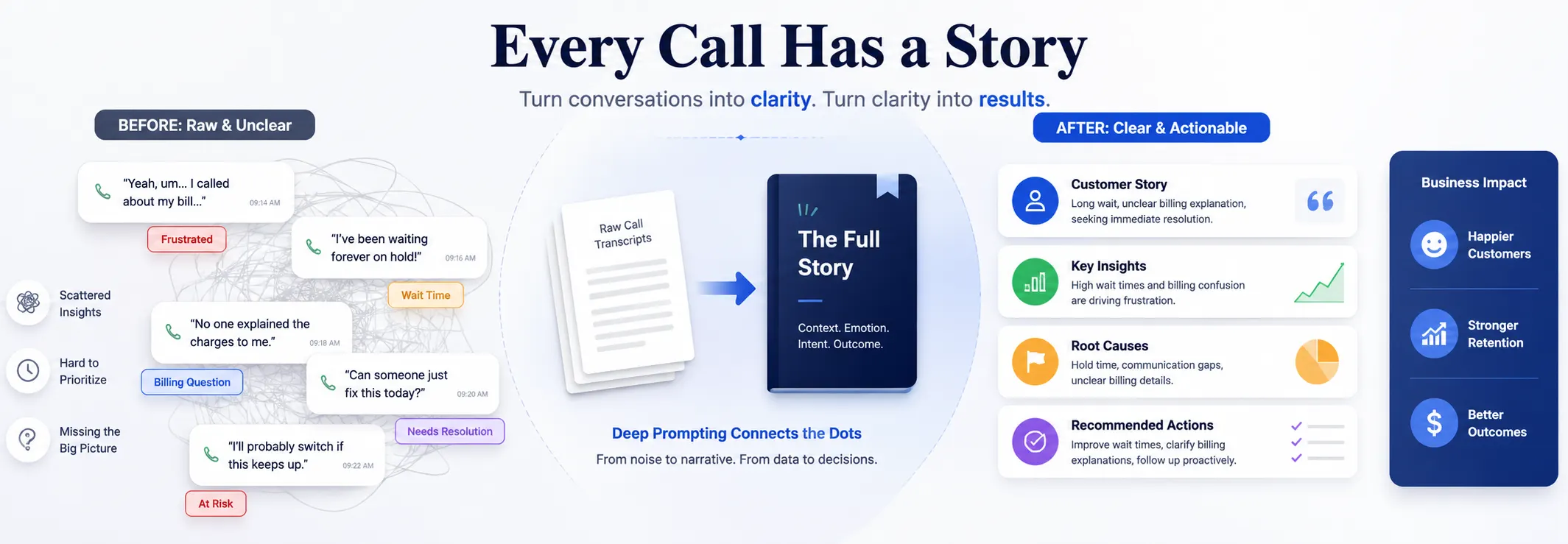
Without Deep Prompt vs. with it
Common use cases
What contact center teams use it for
Each panel shows the guidance prompts that tell the AI what to look for, and the output fields that define what gets returned per conversation.
Interactive demo
See how it’s built
Write guidance, define your outputs, see structured results. In the actual platform, you run this against a real conversation ID from your call data.
What happens next
Where results go
Once Deep Prompt runs on live conversations, results connect to three places in the platform.
Every output lands in a dataset. Build dashboards, filter by agent or date, drill into individual conversations.
Number outputs can trigger automated actions: evaluation routing, email/SMS alerts, AWS Lambda functions.
Combine Deep Prompt outputs with call metadata for purpose-built reports any team can use.